Taxonomies
In most cases, taxonomies in Cadmus are relatively static and small data, defined via thesauri. Some projects anyway have more specialized requirements for specific taxonomies which could not be optimally satisfied by thesauri alone.
For instance, consider a huge taxonomy about iconographic subjects, including a deep hierarchy of thousands of entries. In this scenario, we would have these requirements:
- manage large data with optimal performance: usually these taxonomies are large, while thesauri are designed for relatively small set of flat or hierarchical data, providing closed data sets for the UI.
- edit with high granularity: thesauri are edited as a set, while in the example scenario users might want to edit single entries from a taxonomy. For instance, it might happen that while describing an iconography, users do not find a proper term in the taxonomy, and would want to add a new one. In this case, we need per-entry editing, as such taxonomy is large and shared, so that it might even be edited concurrently.
In these cases, Cadmus can adopt a taxonomies store. This is an independent system, which can be used even outside Cadmus, backed by a PostgreSQL database including trees and nodes.
In this store, each taxonomy is a tree with 1 or more root nodes; so it could be a flat list as well as a hierarchical list (which happens in most cases). Users can browse and find nodes in a tree, and edit it. To provide an easy experience, each tree (=taxonomy) has a string identifier and a human-friendly name, and each node has a string key and a human-friendly label. Internally, nodes use numeric IDs for performance reasons; but the software layer interacting with the database provides access to nodes via keys, which are designed to be unique within a single tree (Figure 1).
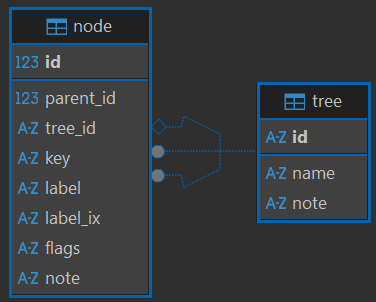
- Figure 1 - The taxonomy store database schema
Thus, to provide a global node identifier, the convention is using the tree ID (a string) + / + the node’s key (a string). Of course, while working in the scope of a single tree a node key is enough.
The taxonomies subsystem provides:
- full backend logic to manage taxonomies.
- API endpoints ready to be integrated in your API.
- frontend components to integrate in your frontend. Cadmus provides a part editor based on these components.
- a Cadmus part, taxonomies store tree nodes part, provides a ready to use part which allows user to pick nodes from any specific tree, while also editing it. This part lets you pick any number of node IDs from a single tree. The tree is specified as the part’s role ID, and lookup and editing parameters can be customized via backend settings for each combination of part type ID and part role ID.
Features
The taxonomies store is simple but generic enough to provide these features:
- both flat and hierarchical taxonomies.
- human-friendly string identifiers for each node.
- aliases and external mappings for each node.
- open set of features for each node.
- lookup and search functionality (extended to nodes, mappings and features).
- configurable, in-place editing with automatic key and filtered label generation.
- automatic data seeding from CSV sources.
- manual data seeding via the Cadmus CLI tool.
Internally, each taxonomy is just a tree. Flat taxonomies are simply trees where all nodes are root-level nodes. This allows dealing with both flat and hierarchical taxonomies.
Additionally, each node can have:
- any number of mappings, which define equivalent entities in other resources. For instance, you might have your own list of persons in a taxonomy store, and provide for each node one or more links to external authority files like VIAF, Biblissima+, etc. The editor component allows you to configure external lookup providers for mappings, so that you can directly pick mapped entities from the respective API services.
- any number of features, i.e. generic name=value pairs used to attach any attribute to it, whatever its nature: e.g. a status (
status=draft), a year (born=384 BC), a color, a category, etc. Features are designed to be generic and unpredictable: the store does not define any feature name, which is up to consumer. Note that a node can have more features with the same name, e.g.son=Markandson=Janefor the two sons of a person, or morecolorfeatures for a multi-colored fruit.
A feature value cannot be empty, nor include
=or~, which are reserved for the search syntax. In API,featuresis a feature criterion, repeated for each criterion (max 20), with syntaxname(the node has a feature with that name, whatever its value),name=value(the feature filtered value is equal to value), orname~value(the feature filtered value contains value, case-insensitive); e.g.features=status=draft&features=color~red. The first=or~separates the name from the value; invalid criteria (empty, or without name) are ignored. Names are matched exactly (case-sensitive).featureMatchModeisall(default: each criterion matched by a feature of the node),any(at least one criterion matched), ornone(no criterion matched).
Each node is designed to represent a unique entity with its own identity (its key), thus providing an authority file. The store focuses on defining the identify of each entity; any additional metadata can be added elsewhere, inside or (usually) outside the store. This is consistent with a simple authority file in the context of semantic web: we just define entities and assign them a unique ID. Unlimited data can then be attached to these entities by just referencing them via their ID.
Thus, taxonomies can be used as a sort of facade between your data and any number of external authority files or ontologies you want to link to. You can even start with an empty taxonomy, and fill it as you enter your data, progressively building it node after node with all their mappings. This is usually more efficient than having multiple links at the same level: for instance, instead of having separate multiple links to VIAF and Biblissima+, and falling back to your own taxonomy when these resources lack the entity you want, you always use a single link to your own taxonomy. In turn, this links to other resources via mappings. This provides more consistency, because your reference is just one, and contains every entity, even those other resources lack; and it’s easier to use, because you just have to look into a single resource.
flowchart LR;
tree --> node1
tree --> node2
tree --> node3

node1 --> VIAF
node1 --> Biblissima
node1 --> etc[...]
node1 -->|alias| node1
- Figure 1 - Nodes as aggregation hubs
So, every node can act as an aggregation hub (Figure 1) connecting its entity to equivalent entities in other resources; this implies that you have to define these external mappings just once, and then they will be available whenever you link to the taxonomy node. For instance, if you have a node for Dante Alighieri, this node can be mapped to the corresponding person in VIAF, Biblissima+, Wikidata, etc. Whenever your data reference that node via the taxonomy store, it will implicitly reference all the equivalent entities in other resources at once.
Mappings can also be used to represent aliases. Each node has its own “canonical” label, but you can provide more aliases by simply adding mappings for them; an alias mapping will just have as its target its source node. In other terms, it will work as a self-referencing mapping providing a new label for the same node.
Data Source
Taxonomies can have any data source. A CSV-based importer is provided, so that you can fully instantiate a taxonomies store by just providing a set of CSV files in your Cadmus API: the API will take care of creating the database if not found, and populating it from the CSV files.
From a user standpoint, taxonomies can be either hierarchical (a tree) or flat (a flat list). From the data model standpoint, all taxonomies are tree structures, because they accommodate both hierarchical and flat structures: a flat list is just a tree having only root-level nodes.
This is why internally every taxonomy is defined a tree, and every entry in it is defined a node.
Each tree and node is identified by a string ID. Internally numbers are used for better performance and smaller size.
🔑 As for string identifiers, the usual convention is:
- the only allowed characters are letters a-z (always lowercase, no diacritics), digits,
_,-,.. Spaces are not allowed! - use
_to replace spaces and reserve-to logically separate ID parts. For instancepg.anti-scomunicati-negligenticorresponds to Purgatorio: antipurgatorio, scomunicati, negligenti (where there are 3 listed places);pg.anti-valletta_principicorresponds to Purgatorio: valletta dei principi (where_is like a space within a single listed place, valletta principi). - use
.to separate branches in a hierarchical tree (the corresponding separator in the label is:), e.g.if.=Inferno,if.selva=Inferno: Selva, etc.
All taxonomies are imported into the editor database from CSV files (comma separated values). ⚠️ Remember that when you have a comma in a string you must wrap the string in "" to avoid the comma being misinterpreted as a column separator.
The editor allows you to define your own filtering function to automatically generate the key from the label.
Tree Files
Tree files have these columns:
id: a string with the taxonomy ID.name: the taxonomy name. This will appear in the UI.note: a short descriptive note for the taxonomy.flat: t
Node Files
Each tree listed in this file has a corresponding nodes file. Node files have these columns:
tree_n: the tree ID they belong to.parent_key: used only for non-flat trees, it is the key of the parent node.key: the node’s key. This is a string identifier which must be unique within that tree.label: the human-friendly label for the node.filtered_label: leave this empty except for corner-case indexing. This is the string which is used to index the entry for lookup search; if not specified, it will be automatically generated by filtering the label (e.g. remove diacritics, lowercase letters, etc.). In some very special cases you might need to provide a non-predictable indexed form (e.g. “zerozerosette” for “007”).flags: this is usually empty. You can use this to include any number of characters where each character is a boolean flag. For instance, in organizations we can define a letter for each subtype:F=family, etc. These flags can be used during lookup to further limit the lookup scope.note: a free text note (max 5000 characters).
Mapping Files
For each entry you can specify any number of mappings to other external authority files (VIAF, Biblissima+, etc.). This way we maintain a single facade as our own taxonomy, which then acts as a hub aggregating all the mappings to equivalent external entities; and this mapping needs to be done only once.
To this end, we create a mappings.csv file with these columns:
tree_n: the tree numeric ID.node_key: the node key to map.scope: the scope of the external target, e.g.viaf,biblissima, etc.target: the target ID in the external authority file.label: a human-friendly label for the target.filtered_label: leave this empty except for corner-case indexing, as for node files.
When using lookup from within the editor to add mappings, scope and label will be automatically derived from the picked target.