Graph Database
In Cadmus, the semantic graph is stored into its own database.
The graph database is usually named after the project plus a suffix -graph. For instance, for the Cadmus Itinera project the graph database is named cadmus-itinera-graph. As for indexes, the current implementation of this database relies on PostgreSQL.
The database model is designed to be a minimalist and performance-wise independent database. Its main purpose is providing editable RDF-like data, mostly automatically generated. To this end:
- URIs are systematically shortened via conventional prefixes. The mapping between prefixes and namespaces is stored in a lookup table.
- internally we just use numeric IDs for each entity.
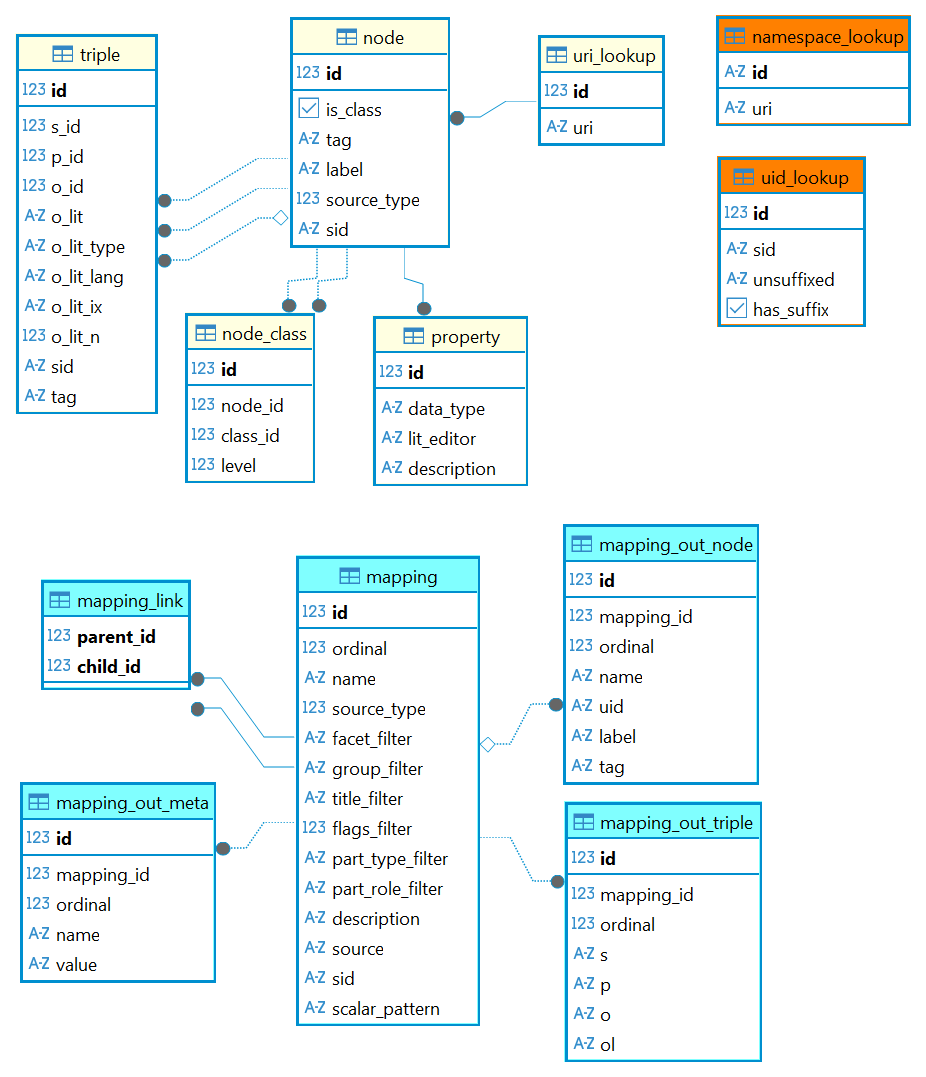
Namespace Lookup Table
- ♦️ name: namespace_lookup.
- 🔑
id(string) PK: the namespace prefix (e.g.rdfs). uri(string): the corresponding full URI (e.g.http://www.w3.org/2000/01/rdf-schema#).
- 🔑
This is a list of prefixes and their namespaces. These prefixes are used to systematically shorten URIs.
Example:
| id | uri |
|---|---|
| owl | http://www.w3.org/2002/07/owl# |
| rdf | http://www.w3.org/1999/02/22-rdf-syntax-ns# |
| rdfs | http://www.w3.org/2000/01/rdf-schema# |
| xml | http://www.w3.org/XML/1998/namespace |
| xsd | http://www.w3.org/2001/XMLSchema# |
UID Lookup Table
- ♦️ name: uid_lookup
- 🔑
idPK AI: the ID. sid(string): the SID.unsuffixed(string): the UID as calculated without its optional final suffix (e.g.x:ms-decorations/angel-1v).has_suffix(bool): true if the UID should be built by adding suffix#+idtounsuffixed(e.g.3generates the complete UIDx:ms-decorations/angel-1v#3).
- 🔑
This table is used to generate UIDs, ensuring that each combination of a SID (=source ID) + a generated entity identifier gets a unique UID. The full rules are described in the UID builder section.
This essentially is a lookup table, which gets filled whenever a new UID for a graph entity gets calculated. While SID calculation is idempotent (=the same source always has the same globally unique ID), UID calculation is not, because to ensure friendly values UIDs are generated from user-entered data, like an item’s title.
So, it might happen that two UIDs from two different sources (as identified by SIDs) clash. In this case, when the mapping requested a unique UID (with a template ending with ##), the new UID must receive a unique numeric suffix (in the form #N). This number is provided by the database itself, which ensures it is unique, and gets forever associated to that UID and SID.
This association allows re-creating the same UID whenever adding the same entity (as identified by SID) using the same calculated UID.
Consider this example:
-
during edit, we save an entry with EID=
angel-1v(a decoration representing an angel in a manuscript’s page) in the context given by SIDbf849795-375e-4deb-9f91-3b03630ea2fa/eid/angel-1v. Say the generated UID for this entry (as specified by mapping) isx:ms-decorations/angel-1v. We now want to be sure that this UID is unique. -
first, the graph projection system searches the UID table for records having an unsuffixed UID equal to the generated one (
x:ms-decorations/angel-1v). In this example, it finds one (or more), because it happens that somewhere else in the database there is another decoration which was given the same human-friendly identifier (angel-1v). So, the projector gets from the database a numeric suffix, say 23, and appends it to this decoration. The trick for getting this numeric value is just that this table’s PK is an autoincremented number. So, whenever we add a new record to it, we automatically get this number. If required, this will then be used as the UID’s suffix. -
in this example, we need a suffixed UID because we found other records with the same unsuffixed UID. Here, the new UID gets saved into the UID lookup table as a record corresponding to
x:ms-decorations/angel-1v#23, connected to SIDbf849795-375e-4deb-9f91-3b03630ea2fa/eid/angel-1v(whose first component is the GUID of the decorations part where our angel was located). In the table, this means that we save both the unsuffixed UID and its SID, and set thehas_suffixfield to true, meaning that we’re going to use the record’s PK (the autonumber) as the UID’s suffix. -
later, a user deletes this decoration.
-
later again, a user decides to re-enter the same decoration, in the same part. As a SID is idempotent, this produces again the same SID:
bf849795-375e-4deb-9f91-3b03630ea2fa/eid/angel-1v, with an unsuffixed UIDx:ms-decorations/angel-1v. Looking up the UID table, we now find that 1 or more records already exist with an unsuffixed UID equal to this value. Also, among them there is one with the same SID, too; the one saved when the angel decoration from that part was first saved. So, rather than requesting a new number for its suffix, we reuse the old number, gettingx:ms-decorations/angel-1v#23again.
This ensures that the same entity (as identified by its SID) always corresponds to the same UID. The same happens whenever the decoration is saved again: the entry for its SID is reused, so that its UID never changes. The UID lookup table model is thus designed for the purpose of completing the generation of each UID.
URI Lookup Table
- ♦️
uri_lookup: this is a mapping between unique numeric IDs and URIs, used to reduce tables size and enhance performance. Internally, RDBMS records are identified by a simple numeric ID, which corresponds to a full URI.- 🔑
id(int) PK AI: the numeric ID. uri(string): the corresponding URI (where namespaces are replaced by prefixes for more readability; e.g.rdfs:label). It is assumed that all the prefixes used here are resolved innamespace_lookup. URIs are case-insensitive, and unique.
- 🔑
Example:
| id | uri |
|---|---|
| 1 | rdfs:Resource |
| 2 | rdfs:Literal |
| 3 | rdfs:XMLLiteral |
| 4 | rdfs:Class |
| 5 | rdfs:Property |
| 6 | rdfs:DataType |
| 7 | rdf:type |
| 8 | rdfs:subClassOf |
| 9 | rdfs:subPropertyOf |
| 10 | rdfs:domain |
| 11 | rdfs:range |
| 12 | rdfs:label |
| 13 | rdfs:comment |
| 14 | rdfs:seeAlso |
| 15 | rdfs:isDefinedBy |
Node Table
- ♦️
node: a node projected from a Cadmus record or added from any external sources (e.g. by a user, or imported from somewhere else).- 🔑
id(int) PK FK. The ID got viauri_lookupfrom a string UID. The latter is calculated from mappings, or just entered from scratch by users. It should be in a URI-like form, shortened with a prefix, like e.g.x:persons/barbato_da_sulmona. is_class(boolean): a value indicating whether this node is a class. This is a shortcut property for a node being the subject of a triple with S=class URI, predicate=aand object=rdfs:Class(orowl:Class– note thatowl:Classis defined as a subclass ofrdfs:Class). Given the importance of class nodes in editing, this is a performance-wise shortcut.tag: a general purpose tag for the classification for nodes. For instance, this can be used to mark all the nodes potentially used as properties, so that a frontend can filter them accordingly.label(string): the optional label used to designate this entity in a human-friendly way. This is defined by mapping, or manually entered by user.source_type(int): set from the mapping which generated this node: 0=user (manually created), 1=item, 2=part, 3=thesaurus, 4=implicit (added because used by a triple, without being generated as a node).sid(string): the SID built from the identity of the source data record, or null if user-defined. This tells which source owns the node (see updating).
- 🔑
💡 If you need other UIDs for the same entity, you can add them manually or import from external sources, connecting them to the original node with
owl:sameAspredicate, ideally in the sense of “same thing as but different context” (see Halpin H., Herman I., When owl:sameAs isn’t the Same: An Analysis of Identity Links on the Semantic Web, Conference: Proceedings of the WWW2010 Workshop on Linked Data on the Web, LDOW 2010, Raleigh, USA, April 27, 2010).
Node Class Table
- ♦️
node_class: this table is a performance artifact. For each saved node, it gets populated with all its classes, by walking up the sub-class hierarchy of each class. This is required because the process of collecting all the classes and super-classes of any node is recursive and expensive, while operations on node classes in the editor are frequent (e.g. filter by class, show all node’s classes, compare with range/domain restrictions, etc.).- 🔑
id(int) PK FK. node_id(int) FK linked to the instancenode.id.class_id(int) FK linked to the classnode.id.level(int) the depth level at which this class was detected when walking classes starting from the instance node: 1=parent classes, 2=parent classes of parent classes, etc. When a class is reachable via several paths, it is stored once with its minimum level.
- 🔑
In PostgreSQL, this table is populated for each node by the populate_node_class procedure, which walks the rdf:type triples of the node and then the rdfs:subClassOf hierarchy with a recursive CTE. The walk has a maximum depth (32 levels), so that cycles in rdfs:subClassOf cannot make it endless. The table is updated automatically whenever the graph changes, only for the affected nodes.
⚙️ Recursively querying an RDBMS database implies using recursive CTEs. For instance, in MySql (this example is drawn from the time where Cadmus used MySql rather than PostgreSQL; the logic is the same):
with recursive cn as (
 -- ANCHOR
 -- get object class node
 select t.o_id as id, 1 as lvl from node n
 -- of a triple having S=start node P=a O=class node
 inner join triple t on t.s_id=n.id and t.p="a"
 left join node n2 on t.o_id=n2.id and n2.is_class=true
 where n.id=1
 UNION DISTINCT
 -- RECURSIVE
 select t.o_id as id, lvl+1 as level from cn
 inner join triple t on t.s_id=cn.id and t.p='sub'
 left join node n2 on t.o_id=n2.id and n2.is_class=true
)
select cn.id,cn.lvl,node.label from cn inner join node on cn.id=node.id;
So, from these sample data:
NODE
id   label    is_class
----------------------
1    John     0
100  artist   1
101  person   1
102  animal   1
103  explorer 1

TRIPLE
s_id p   o_id
-------------
1    a   100 = John a artist
1    a   103 = John a explorer
100  sub 101 = artist sub person
101  sub 102 = person sub animal
Executing the anchor query like this:
select t.o_id as id, 1 as lvl,n2.label from node n
inner join triple t on t.s_id=n.id and t.p="a"
left join node n2 on t.o_id=n2.id and n2.is_class=true
where n.id=1
returns all the direct parent classes (lvl 1) of the John node:
100 1 artist
103 1 explorer
These are the results of the anchor query. Then, the recursive query finds all the classes which are parent of the classes found in the previous step:
100 1 artist
101 2 person
102 3 animal
103 1 explorer
Property Table
- ♦️
property: in RDF a property is an entity which can be used as predicate (e.g.dbo:birthDate). The practical purpose of adding property-related data to a node is providing a list of predicates to pick from when building a triple, or applying some restrictions to it.- 🔑
id(int) PK FK. The numeric ID got from mapping the property node UID to a number inuri_lookup. This establishes a 1:1 relationship between a node and its metadata as a property. data_type(string): for literals objects, this defines the allowed data type.lit_editor(string): an optional key representing the special literal value editor to use (when available) in the editor. This can be used to offer a special editor when editing the property’s literal value. For instance, if the property is a historical date, you might want to use a historical date editor to aid users in entering it. Editing value as a string always remains the default, but an option can be offered to edit in an easier way when the value editor is specified and available in the frontend.description(string): an optional human-readable description.
- 🔑
Node Mapping Tables
A node mapping is modeled with 5 tables:
- ♦️
mapping:- 🔑
idPK AI ordinal: the order of application among siblings.namesource_typefacet_filtergroup_filtertitle_filterflags_filterpart_type_filterpart_role_filterdescriptionsourcesidscalar_pattern
- 🔑
- ♦️
mapping_link: the parent-child relationships among mappings. A mapping without parents is a root mapping. As named children mappings can be shared by several parents, this is a many-to-many relationship.- 🔑
parent_idPK FK - 🔑
child_idPK FK
- 🔑
- ♦️
mapping_out_node:- 🔑
idPK AI mapping_idFKordinalname: the node key.uidlabeltag
- 🔑
- ♦️
mapping_out_triple:- 🔑
idPK AI mapping_idFKordinalspool
- 🔑
- ♦️
mapping_out_meta:- 🔑
idPK AI mapping_idFKordinalnamevalue
- 🔑
The ordinal of outputs preserves their definition order, as templates may refer to previously emitted nodes and metadata.
Triple Table
- ♦️
triple: a triple.- 🔑
id(int) PK AI. s_id(int): FK. Subject, linked to a node.p_id(int): FK. Predicate, linked to a property.o_id(int): FK. Object, linked to a node.o_lit(string): an optional literal value. This is alternative too_id.o_lit_type(string): the optional type of the literal (e.g.xs:int).o_lit_lang(string): the optional language of the literal (e.g.en).o_lit_ix(string): the literal value as filtered for searching it (e.g. lowercased and without diacritics).o_lit_n(double): the numeric value of the literal, when it has a numeric or boolean type. This allows for numeric searches.sid(string): the SID of the source which generated the triple, or null if user-defined.tag: a general purpose tag, used to tag triples for some reason. The primary purpose is marking those triples which represent restrictions, like those composed by subproperty of (rdfs:subPropertyOf), domain (rdfs:domain), range (rdfs:range), literal only (owl:DataTypeProperty), object only (owl:ObjectProperty), symmetric (owl:SymmetricProperty), asymmetric (owl:AsymmetricProperty). Except for domain/range/subproperty, which are used as predicates (property - has-range - node), all the other restrictions listed here are used as objects (property - is-a - object-property).
- 🔑
Indexes and Upgrades
⚙️ The PostgreSQL schema is in two scripts: one creating tables and preset data, and another (idempotent) creating all the indexes and procedures. When a new graph database is created, both are run. Existing databases created by older versions are upgraded by running the second script, which only adds what is missing: the Cadmus API does it at each startup, and so does the CLI command create-db graph. On big graphs, the first upgrade may take some time to create the missing indexes.
The indexes are designed for the queries actually used, considering that the graph is updated at each save:
- case-insensitive lookups of URIs (unique), namespaces, and UIDs;
- SID exact and prefix lookups for nodes and triples (i.e. the graph of each source);
- trigram indexes (PostgreSQL extension
pg_trgm) for “contains” searches on node labels and URIs, as used by node lookups in the editor; - triples by subject and predicate, object and predicate, and predicate (graph walking, linked nodes, node classes population, foreign key cascades);
- node classes by node and by class.
The unique index on URIs is created only when there are no URIs differing only by case. Databases created by old versions might have such duplicates: in this case a warning is emitted, and a non-unique index is created instead. Lookups still work, but you should merge the duplicate nodes.