Taxonomies
In most cases, taxonomies in Cadmus are relatively static and small data, defined via thesauri. Some projects anyway have more specialized requirements for specific taxonomies which could not be optimally satisfied by thesauri alone.
For instance, consider a huge taxonomy about iconographic subjects, including a deep hierarchy of thousands of entries. In this scenario, we would have these requirements:
- manage large data with optimal performance: usually these taxonomies are large, while thesauri are designed for relatively small set of flat or hierarchical data, providing closed data sets for the UI.
- edit with high granularity: thesauri are edited as a set, while in the example scenario users might want to edit single entries from a taxonomy. For instance, it might happen that while describing an iconography, users do not find a proper term in the taxonomy, and would want to add a new one. In this case, we need per-entry editing, as such taxonomy is large and shared, so that it might even be edited concurrently.
In these cases, Cadmus can adopt a taxonomies store. This is an independent system, which can be used even outside Cadmus, backed by a PostgreSQL database including trees and nodes.
In this store, each taxonomy is a tree with 1 or more root nodes; so it could be a flat list as well as a hierarchical list (which happens in most cases). Users can browse and find nodes in a tree, and edit it. To provide an easy experience, each tree (=taxonomy) has a string identifier and a human-friendly name, and each node has a string key and a human-friendly label. Internally, nodes use numeric IDs for performance reasons; but the software layer interacting with the database provides access to nodes via keys, which are designed to be unique within a single tree (Figure 1).
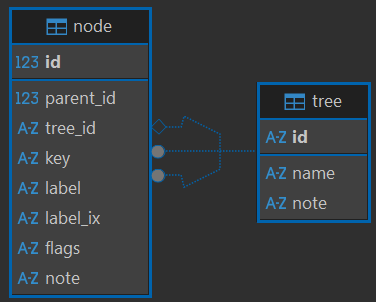
- Figure 1 - The taxonomy store database schema
Thus, to provide a global node identifier, the convention is using the tree ID (a string) + / + the node’s key (a string). Of course, while working in the scope of a single tree a node key is enough.
The taxonomies subsystem provides:
- full backend logic to manage taxonomies.
- API endpoints ready to be integrated in your API.
- frontend components to integrate in your frontend. Cadmus provides a part editor based on these components.
- a Cadmus part, taxonomies store tree nodes part, provides a ready to use part which allows user to pick nodes from any specific tree, while also editing it. This part lets you pick any number of node IDs from a single tree. The tree is specified as the part’s role ID, and lookup and editing parameters can be customized via backend settings for each combination of part type ID and part role ID.
Data Source
Taxonomies can have any data source. A CSV-based importer is provided, so that you can fully instantiate a taxonomies store by just providing a set of CSV files in your Cadmus API: the API will take care of creating the database if not found, and populating it from the CSV files.