Snapshot Sample 1
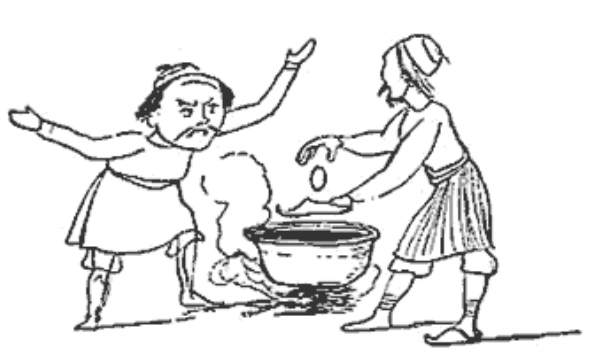
There was an Old Man of Thermopylae,
Who never did anything properly;
  But they said, "If you choose,
  To boil eggs in your shoes,
You shall never remain in Thermopylae".
- adapted from Edward Lear. A Book of Nonsense. London: Routledge, Warne & Routledge, 1861. Plate 72.
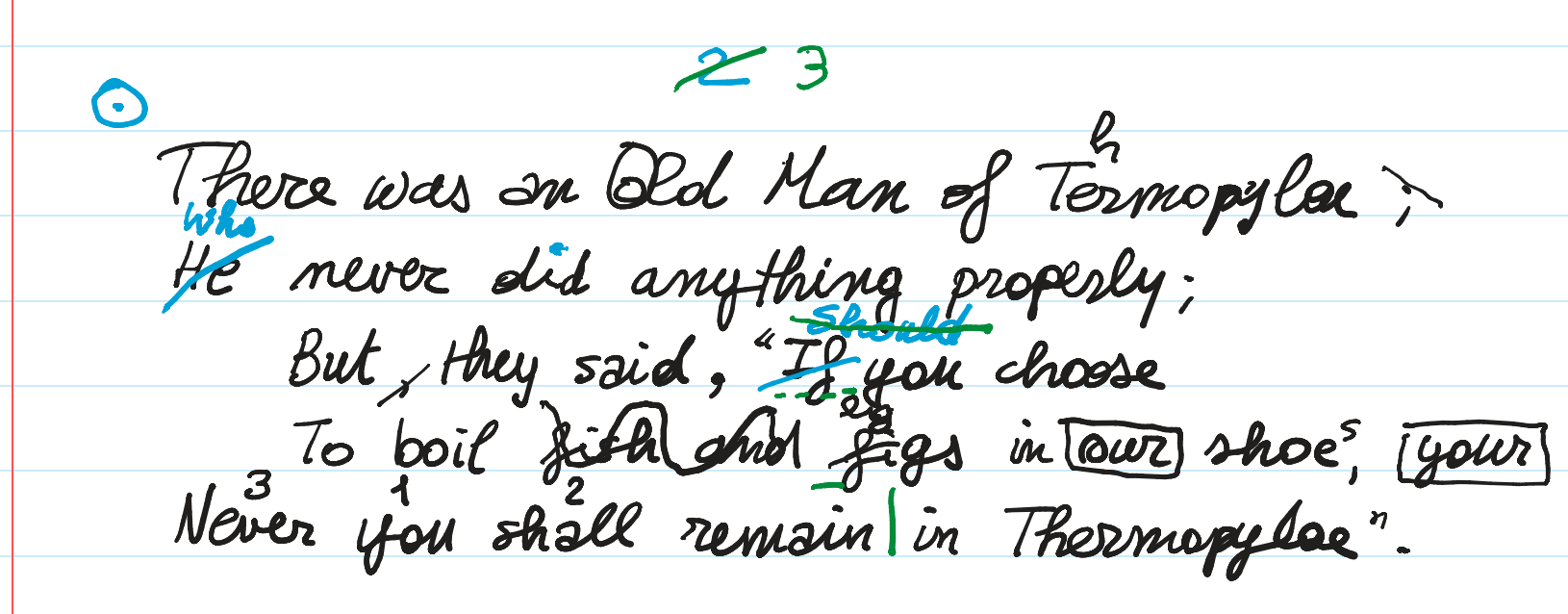
In this example, we use this mock manuscript text:
Description
Let us pretend this is an autograph manuscript shwowing 3 hands with 3 different colors, in this order:
- black, which is the base text, following the printed lines in the notebook page.
- blue.
- green.
Adopting the convention to describe the various operations on this text from top to bottom and from left to right within each hand, we can provide the following reconstruction.
Note that the convention does not apply to numberings and other signs added outside the epigram’s text to make it an item of some collection. These are usually encoded at the end of each hand.
- black hand:
▶️ (1) uppercase old → Old. We reconstruct this as an “immediate” correction, i.e. the same hand immediately recognized the lowercase as an error and corrected it into uppercase while writing.
▶️ (2) add the missing h to Termopylae → Thermopylae.
▶️ (3) change ; to , after Termopylae. The semicolon here gets changed into a comma by simply crossing out the dot above the comma in the semicolon. This is a compendiary way of representing this replacement, much more effective in handwriting.
▶️ (4) delete the comma after But.
▶️ (5) add a comma after said. This is logically connected to the previous operation (we are moving the comma).
▶️ (6) delete fish and. The hand scribbled on top of these words to mean their deletion.
▶️ (7) figs → eggs. The hand here just wrote a smaller eg on top of fi in figs.
▶️ (8) our → your. Here the hand boxed out our and added your at the right edge of the verse, with the same box, meaning that this new text should replace the original one.
▶️ (9) shoe → shoes. Here the hand just added a smaller s at the top right of shoe.
▶️ (10) reorder Never you shall into You shall never. This is very compressed in the manuscript, which just added smaller numbers on top of these words to mean their reordering.
- blue hand:
▶️ (11) add the missing dot above i in did.
▶️ (12) If → Should. The new word was written above the old one, which was crossed out.
▶️ (13) add a circled dot drawing at the beginning of the epigram, to mark it as an item of some collection.
▶️ (14) add the number 2 on top of the epigram.
- green hand:
▶️ (15) cross out Should and add a dotted underline to If to mean we want to revert to the original word.
▶️ (16) annotate ai in remain as long (a metrical annotation).
▶️ (17) add a vertical stroke after remain to mark colometry.
▶️ (18) renumber epigram 2 to 3. 3 was written to the right of the original number which was crossed out.
Base Text
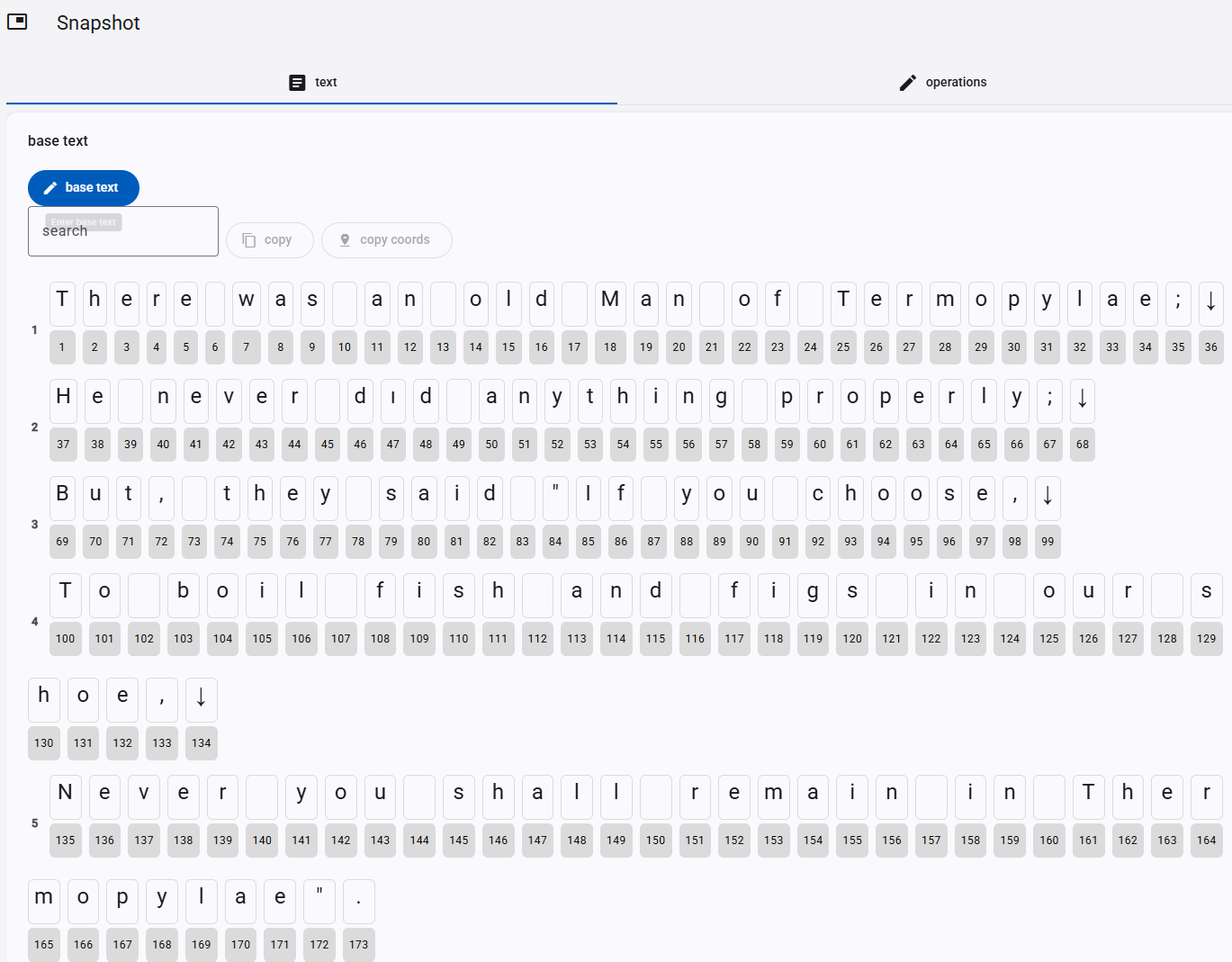
Let us start encoding this snapshot. The first step is defining the base text, representing the starting point for all the transformations:
There was an old Man of Termopylae;
He never dıd anything properly;
But, they said "If you choose,
To boil fish and figs in our shoe,
Never you shall remain in Thermopylae".
👉 Hands-on:
- create a new item with title
Thermopylaeand the description you like. Ensure its facet issnapshot, and save it. - edit the newly created item, and add a new snapshot part to it.
- edit the newly added snapshot part.
- in the text tab, expand
base textand click thebase textbutton to enter the new text. In the popup window, paste the above text and clickSet. - it’s a good idea to save the snapshot part by clicking the bottom
savebutton.
Operations
Let us now define the operations following our description.
Indentation
Indentation is encoded just like any other aspect of the visual layer, i.e. via features.
To this end, add an annotate operation with a char offsets feature which contains an expression defining all the horizontal and/or vertical offsets for all characters which start an indented or otherwise offset text.
👉 Hands-on:
- in the
operationstab, click theadd operationbutton. - pick as type
annotate, setat=1 andrun=1 (conventionally we just target the first character of the text). - click the
+featurebutton and under name pick thechar offsetsfeature; you can also type any characters of this name in the top search box (which opens when you click the name dropdown) to quickly locate it. Then invaluetype69:x=100 100:x=100. Let us dissect this value (look at the rendition documentation for more):69:means that you are targeting character ID 69.x=100means that you are setting a horizontal offset equal to 100 pixels (this is just a convenient value, you can change it as you want).- again, the next expression after space says to add a horizontal offset equal to 100 to character with ID=100.
- save the feature (round check button) and the operation (
savebutton). The operation appears in the list. Before looking at the rendition, let us add an alteration to the base text with the next operation.
The separation of indentation from base text here is just a matter of convenience to ensure a uniform model. We set the input text as plain text, and then separate its visual aspect (like indents) on the visual layer via a rendition feature.
Black Hand
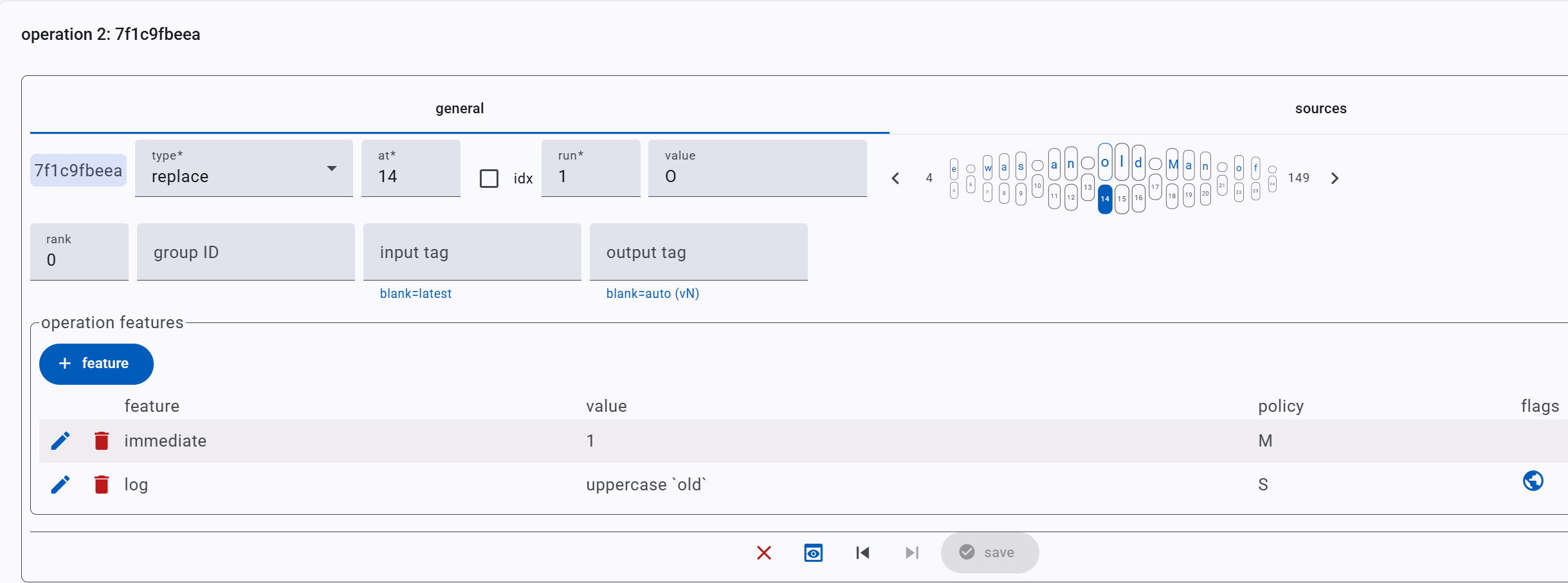
▶️ (1) replace old → Old. Here we literally replace o with O, adding an immediate feature with value 1 (which here represents the true value of a boolean feature).
👉 Hands-on:
- in the base text display, check the
ocharacter you want to replace. This has ID=14. If you click it, the new operation you are going to add will pick the current selection as its coordinates; or you can just go ahead, add a new operation, and then set the coordinates. - in the
operationstab, click theadd operationbutton. - pick as type
replace, setat=14 andrun=1, and enter the new textOinvalue. - let us now add a couple of features:
- immediate: click the
+featurebutton and under name pick theimmediatefeature. Then invalueselect1, which is the only possible value for this feature, which is a boolean feature. Then, click the round checkmark button to add this feature. - log: conventionally we always add a log feature to each operation to quickly describe it. So repeat the above procedure, pick
logas the feature name, and invaluetype something likeuppercase 'old'. - finally, click
saveto save the operation, and the bottomsavebutton to save the whole part if you want to save it; or just the run button of the newly added operation. This will update the rendition section.
- immediate: click the
- in the rendition section, click the play button and look at the
o: you will see it replaced by an overwrittenOafter a few instants, just like it happened in our manuscript.
As for the rendition, there is no need for rendition-oriented features here, because the defaults are just fine. The O appears overwritten and has the same black color of the base text, because the default position for added text is origin and the default text color is black.
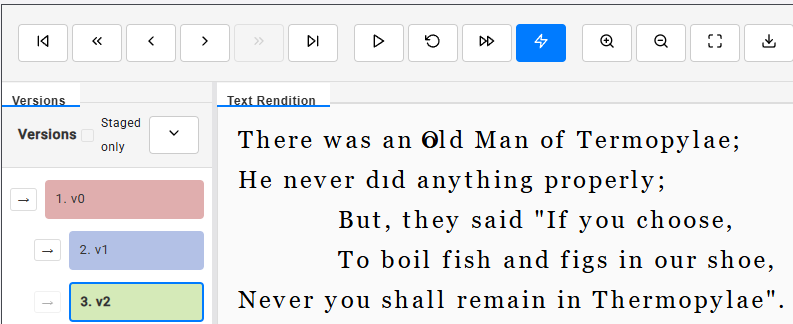
Note the indents, and on the left the 3 colored rectangles representing v0 (=base text), v1 (indentations), v2 (replacement).
▶️ (2) replace Termopylae → Thermopylae: here we add h after T. So, we can encode this as an add-after operation. Note that we might as well encode it as a replacement considering the whole word (Termopylae → Thermopylae), but usually at least in GVE we aim to a representation very close to the visual (diplomatic) layer.
We thus repeat the above procedure: add a new operation, set type=add-after and at=25 (the T of Termopylae). As for features, add:
position=north-eastbecause thehis positioned at the top-right ofT.font size=18to make it smaller. The default font size in this project is 24.log=add 'h' after 'T' in 'Termopylae'.
If you play the rendition again, it ends with this image:

▶️ (3) replace ; → , after Termopylae. Visually, in our manuscript we just have a descending diagonal stroke on the dot above the comma of the semicolon. We now want to encode exactly this on the visual side, while still preserving the effective text alteration, which is a replacement (comma instead of semicolon). So, first we start with the text layer, adding a replace operation at 35 with run 1 (=;) with value ,. Then, we add these features:
hints=diagonal stroke down: this is the sign used to mean the deletion of the dot. As for all signs, it comes from our catalog of hints.log=cross out dot of ';' after Termopylaeforeground color=black: this is the color for the hint. You must always explicitly define a color for it (unless you encode it in the hints catalog).hint Y offset=-0.25th: this moves the hint up for about one quarter the average character height; otherwise, given its default origin position, the line would extend up to the comma below the dot.overridden text value=(empty): this tells the renderer to not display the added text, here comma. This would be pointless, because the comma is already there. So, textually we replace;with,, but visually we just draw a line on the dot of;, without rewriting the comma. This is exactly what we encode with these features.

▶️ (4) delete the comma after But. We could also represent this with a move operation, but in this example we aim at maximum granularity. At any rate, we consider this delete logically connected to the next addition, so we add a group ID to this operation (with value move-comma): we will add the same group ID to the next operation too, thus virtually grouping them.
So here the operation is of type delete, at 72 with run 1. Its features are:
hints=diagonal stroke upforeground color=blackhint Y offset=0.25th: this moves the stroke one-quarter the average character height down.log=delete comma after 'But'
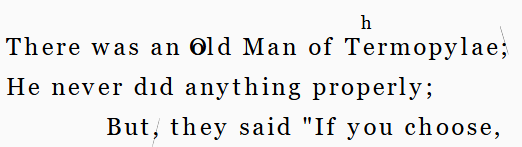
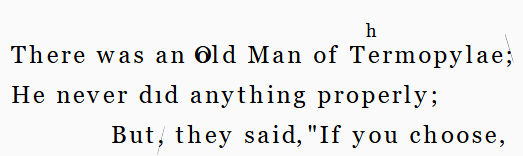
▶️ (5) add comma after said: we add an add-after operation at 82, with group ID=move-comma and these features:
position=east: place the comma at the right ofsaid.log=add comma after 'said'
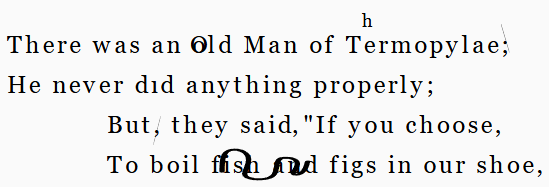
▶️ (6) delete fish and plus its following space. Note that we include the space because otherwise the resulting text would have 2 spaces, the one before fish and the other after and. So we add a delete operation at 108 with run 9 and these features:
hints=scribble (wavy)foreground color=blackhint X scale=0.8: this scales down the scribble drawing width to 80% so that it does not cover the end part ofand, like in the manuscript. Of course this is just a diplomatic detail and we could omit it as well.log=delete 'fish and_'
▶️ (7) replace fi in figs with eg, whence eggs. This is a replacement operation at 117 with run 2 with value=eg and these features:
position=north: the text is added above the old one.font size=18: the added text is smaller.hints=diagonal stroke up: the stroke onfi.foreground color=blacklog=replace 'fi' of 'figs' with 'eg'
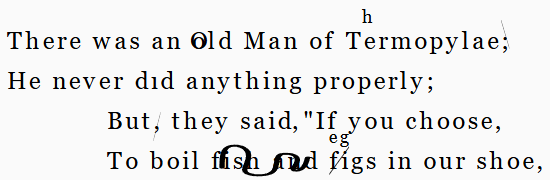
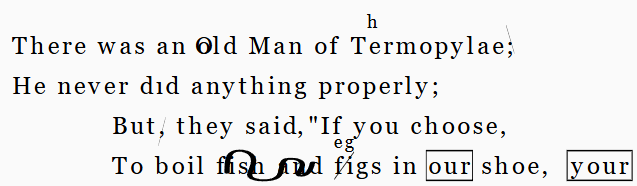
▶️ (8) replace our with your. Note that we could just add y before our as well; but this representation is closer to the visual layer, where the hand boxed the original word and fully wrote the new one, boxed too.
So, to be consistent with a granular diplomatic representation, here we can define 3 logically grouped operations (all sharing an our-2-your group ID):
- annotate
our(i.e. at 125x3) with a box. Features:hints=boxforeground color=blacklog=box 'our'
- replace
ourwithyour(same coordinates, value=your). Features:position=east: position the new text to the right of the verse.X offset=1tw: offset the new text to the right to leave some gap, like in the manuscript, approximately equal to the average width of 1 character.displaced text span=129x5: place the added text with reference toshoe,rather than with reference to the targeted text. This allows positioning it at the right of the whole verse. Otherwise, it would be positioned at the right of the replaced text in that verse, overwriting what follows.log=replace 'our' with 'your'
- annotate
yourwith a box.
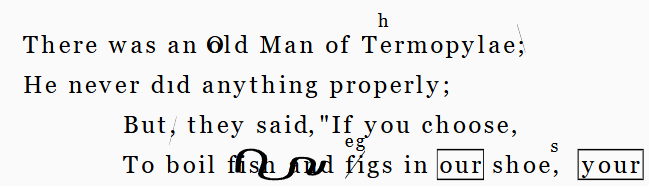
▶️ (9) add s after shoe (add-after at 132, value=s). Features:
position=north-east: position at top-right ofshoe.font size=18: make added text smaller.Y offset=0.25th: slightly offset down.log=add 's' after 'shoe'
▶️ (10) reorder Never you shall into You shall never by adding numbers on top of these words (3, 1, 2). This is encoded with 6 grouped operations (group ID=reorder):
- annotate
youwith1(at 141, run 3). This annotation uses a hint including a placeholder: the hint represents some text written on top of the reference text as an annotation which is not going to become part of the text, like here the number1. The hint isnote (interlinear above)meaning a note placed above its reference text, typically between two lines. This means the text will be smaller to fit into the interlinear space, and it will be placed above the reference text. The text itself is provided to the hint by another feature, namednote. So, features are:hints=note (interlinear above)note=1: the value to fill the text placeholder in the hint.log=add '1' on 'you'
- annotate
shallwith2(at 145, run 5). Features:hints=note (interlinear above)note=2: the value to fill the text placeholder in the hint.log=add '1' on 'you'
- annotate
Neverwith3(at 135, run 3). Features:.hints=note (interlinear above)note=3: the value to fill the text placeholder in the hint.log=add '1' on 'you'
- move
Never_aftershall_. Until now we have just added numbers on top of words, to encode the visual layer. We now need to apply the change meant by them by reordering the text as indicated by those numbers. This implies movingNeverand its following space aftershalland its following space, whenceyou shall Never. Features:log=move 'Never_' after 'shall_'
- replace
ywithYinyou. This is implicitly required by the fact that nowyouhas become the first word of the sentence and must be capitalized to get a uniform text. Features: overridden text value=(empty): we need to tell the renderer to avoid displaying the new textY, so we can reproduce the facsimile. This is just an operation implicit in the reordering, and is not visible in the manuscript.log=uppercase 'y' of 'you'- replace
NwithninNever. For the same reason, we need to lowercaseNeverwhich now is no longer the first word of the sentence. Features:overridden text value=(empty) as above.stage name=AS1: this is an important feature: it says that we have completed all the operations belonging to the black hand, which ended with a specific stage of the text we consider as self-contained and meaningful. All the operations we have encoded so far were just steps towards this waypoint. We thus flag the stage reached at this point as the first alteration stage (AS1=alteration stage 1 is just a convention, you can name the stage as you want).log=lowercase 'N' of 'Never'
💡 Note that the operations adding numbers are all equal except for their coordinates and the note’s text. So you can use the clone button of the first such operation to quickly generate the others and then adjust their properties accordingly.
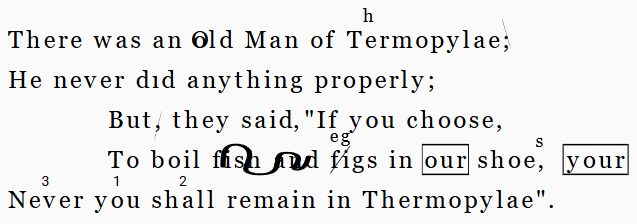
If you look at the rendition while it plays, you can note that the visual result of the operations affecting text is no different from that after the operations which add number. That’s because the last 3 operations in this group are changing the text in the way indicated by visuals, while keeping visuals themselves unchanged.
Blue Hand
▶️ (11) add the missing dot above i in did. As we effectively typed a dotless i in the original text, this is a replace operation at 47 (run 1, value i) with these features:
hints=i-dot: this hint is designed right to represent the dot of a dotlessi. There are other similar hints too, like umlaut.foreground color=blue: note that from here on the color is blue.- overridden text value=(empty): we do not want the new
ireplacing the dotlessiin the text to appear on the rendition; we just want the dot above the dotlessi. log=add dot to 'i' of 'did'
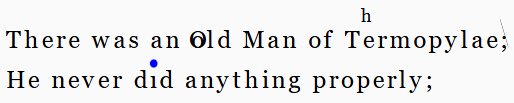
This hint slightly exaggerates the dot size on purpose, to make it more visible in the rendition. You can change this detail by either editing the hint or applying a scale feature to it.
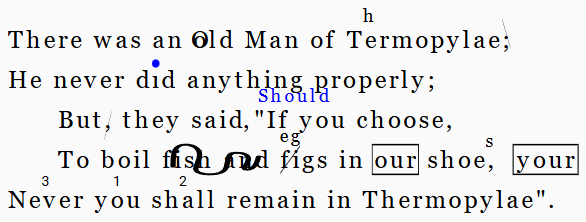
▶️ (12) replace If (at 85, run 2) with Should. Features:
At this stage, we realize that the indentation is too wide: in our manuscript Should is below anything, slightly offset to the right. In fact, looking at verses, the word But should appear below never. So we just change the indentation values from 100 to 50 in the first operation and run the operations again.
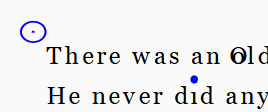
▶️ (13) annotate the epigram (top left of first line: at 1, run 1) by marking it with a circle dot. Features:
hints=circle (dotted)foreground color=bluehint position=north-west: top left of first line.hint Y scale=0.75: shrink vertically to compensate for automatic sizing, because the reference text is just one character (the first one), and this will shrink the hint horizontally.log=add circled dot to epigram
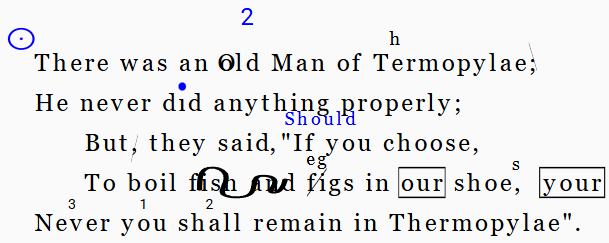
▶️ (14) annotate the epigram by adding its number 2 on top of the text (at 15 run 2, corresponding to ld of old). Features:
hints=note (above)note=2: the content of the hint’s text placeholder.foreground color=bluehint Y offset=-0.75th: sligthly move the number up.log=add epigram number '2'stage name=AS2: this completes the green hand stage.
Green Hand
▶️ (15) cross out Should and add a dotted underline to If, i.e. restore it. This implies two operations, grouped under restore:
- replace
ShouldwithIf(at 186 run 6). Features:hints=horizontal strokeforeground color=darkgreen: note that from here on we use green.reason=revert changeoverridden text value=(empty): this ensures that the renderer does not displayIfoverShould, because the manuscript here restoresIfby just crossing outShouldand underliningIf.log=restore 'If' from 'Should'
- annotate
If(at 85 run 2) with dotted underline. Features:hints=line - bottom dottedforeground color=darkgreenlog=underline restored 'If'
Note that here we are annotating a text which is no longer present in the current alteration:
Ifhas been replaced byShould. Yet, just like all written characters stay on the paper forever, so added nodes are kept in the chain forever. Also note that once you addIfagain, its characters have their own identifiers, different from those of the originalIf, right because each character is kept in the chain with its ID. So, keep this in mind should you later add operations involving this restoredIf: its identifiers will not be those of the base textIf.
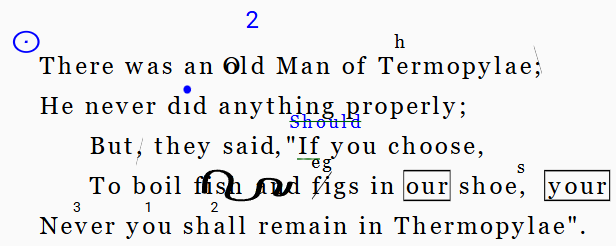
▶️ (16) annotate ai (at 154 run 2) in remain as long. Features:
hints=line - topforeground color=darkgreenreason=metricallog=add macron on 'ai' of 'remain'
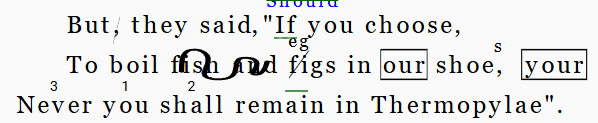
▶️ (17) add a vertical stroke after remain (at 156) to mark colometry.
hints=line - rightforeground color=darkgreenhint X scale=2: the vertical line references a single character, so it would be rendered very narrow. To compensate for this we horizontally stretch it by 200%.reason=metricallog=add vertical line after 'remain'
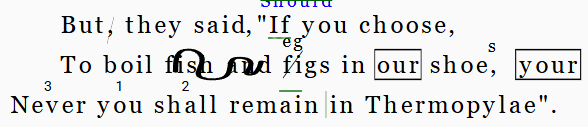
▶️ (18) renumber epigram 2 to 3. 3 was written to the right of the original number which was crossed out. This implies two operations, grouped under renumber:
- annotate the previous number (the blue one), using the same reference (at 15 run 2) to cross it out. Features:
hints=diagonal stroke upforeground color=darkgreenhint position=north: position on top ofldofold.hint Y offset=-0.75th: slightly offset up.log=cross out number 2
- annotate the epigram with a new number. Features:
hints=note (above)foreground color=darkgreennote=3: the text to fill the placeholder in the hint.hint position=northhint Y offset=-0.75thlog=add epigram number '3'
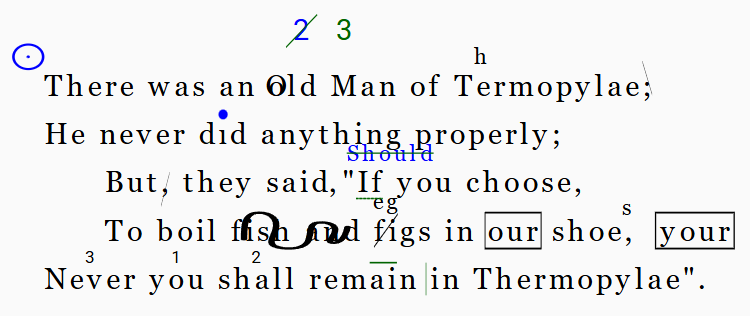
This is the final rendition in its symbolic, computable and interactive form. Compare it with our manuscript facsimile: it appears as a stylized version of it, where each sign is specifically added and annotated according to our reconstruction.
DSL
If we now want to get a compact, text-based representation of the operations encoded until now, we can click the Copy operations as DSL button in the top toolbar of the operations tab. This will copy in the clipboard the following text:
1×1: [r_char-offsets="69:x=50 100:x=50"]
14×1="O" [immediate=1 *log:="uppercase 'old'"]
25×1+]"h" [*log:="add 'h' after 'T' in 'Termopylae'" r_t-position=ne r_font-size=18]
35×1="," [r_hints=diagonal-stroke-down *log:="cross out dot of ';' after Termopylae" r_h-offset-y=-0.25th r_t-value="" r_fore-color=black]
72×1-@move-comma [*log:="delete comma after 'But'" r_hints=diagonal-stroke-up r_fore-color=black r_h-offset-y=0.25th]
82×1+]","@move-comma [*log:="add comma after 'said'" r_t-position=e]
108×9- [*log:="delete 'fish and_'" r_hints=scribble-wavy r_fore-color=black r_h-scale-x=0.8]
117×2="eg" [*log:="replace 'fi' of 'figs' with 'eg'" r_t-position=n r_font-size=18 r_hints=diagonal-stroke-up r_fore-color=black]
125×3:@our-2-your [*log:="box 'our'" r_hints=box r_fore-color=black]
125×3="your"@our-2-your [*log:="replace 'our' with 'your'" r_t-position=e r_t-offset-x=1tw r_t-displaced-span=129x5]
180×4:@our-2-your [*log:="box 'your'" r_hints=box r_fore-color=black]
132×1+]"s" [*log:="add 's' after 'shoe'" r_t-position=ne r_font-size=18 r_t-offset-y=0.25th]
141×3:@reorder [*log:="add '1' on 'you'" note=1 r_hints=note-interlinear-above]
145×5:@reorder [*log:="add '2' on 'shall'" note=2 r_hints=note-interlinear-above]
135×5:@reorder [*log:="add '3' on 'never'" r_hints=note-interlinear-above note=3]
135×6>]150@reorder [*log:="move 'Never_' after 'shall_'"]
141×1="Y"@reorder [*log:="uppercase 'y' of 'you'" r_t-value=""]
135×1="n"@reorder [*log:="lowercase 'N' of 'Never'" r_t-value="" *version^:=AS1]
47×1="i" [*log:="add dot to 'i' of 'did'" r_hints=i-dot r_fore-color=blue r_t-value=""]
85×2="Should" [*log:="replace 'If' with 'Should'" r_fore-color=blue r_t-position=n r_font-size=18 r_t-offset-x=1tw]
1×1: [*log:="add circled dot to epigram" r_hints=circle-dotted r_fore-color=blue r_h-position=nw r_h-scale-y=0.75]
15×2: [*log:="add epigram number '2'" r_fore-color=blue r_hints=note-above r_h-offset-y=-0.75th note=2 *version^:=AS2]
188×6="If"@restore [*log:="restore 'If' from 'Should'" r_hints=horizontal-stroke r_fore-color=darkgreen reason=revert r_t-value=""]
85×2:@restore [*log:="underline restored 'If'" r_hints=line-bottom-dotted r_fore-color=darkgreen]
154×2: [*log:="add macron on 'ai' of 'remain'" r_fore-color=darkgreen r_hints=line-top reason=metrical]
156×1: [*log:="add vertical line after 'remain'" r_hints=line-right reason=metrical r_h-scale-x=2 r_fore-color=darkgreen]
15×2:@renumber [*log:="cross out number 2" r_fore-color=darkgreen r_hints=diagonal-stroke-up r_h-offset-y=-0.75th r_h-position=n]
18×1:@renumber [*log:="add epigram number '3'" r_hints=note-above r_fore-color=darkgreen note=3 r_h-position=n r_h-offset-y=-0.75th]
In this code each line represents a single operation, starting with its coordinates followed by features within square brackets. This short text represents all the information encoded in this example, from the first to the last alteration, for both textual and visual layers, in a very compact and machine-readable way. Together with the base text, this is all you need to represent the snapshot model.
If you were lost in following up this sample and using the editor, just restart from scratch: paste the base text, then batch add operations pasting the above code, and everything will be complete at once.